
AI lesson planning for differentiated instruction: a practical classroom workflow
A step-by-step lesson planning workflow using AI to differentiate without extra hours. Realistic case study, templates, and guardrails for K–12 teachers.


In this article8 sections
If lesson planning feels like a second job, you’re not alone. In this case study, we follow a composite 7th-grade ELA teacher who uses AI to streamline differentiated instruction across five classes on a rotating schedule. You’ll see the challenge, what was tried, what changed, and a repeatable workflow you can adapt tomorrow—whether you plan in a paper notebook, a shared drive, or a planner like Classroom Radar.
The classroom: one unit, five classes, very different needs
Meet “Ms. Rivera,” a composite 7th-grade ELA teacher with five sections on an A/B rotation. The new unit is argumentative writing using paired texts. In each class she has a mix of multilingual learners, two students with writing-related IEP accommodations, a handful reading two years above level, and several who avoid writing altogether.
The immediate pressure isn’t just differentiation—it’s time. Between rotating days and uneven readiness, yesterday’s mini-lesson is off-track for today’s third period. She needs a way to keep the core goals steady while flexing instruction by period.
Here’s how she used AI to cut setup time, keep rigor high, and adjust groups every other day without living at school.

A practical AI lesson planning workflow for differentiation
1) Clarify goals and success criteria
She starts by writing one-sentence unit goals (claim–evidence–reasoning; counterclaim) and lesson-level success criteria students can understand. This anchors all prompts and prevents “activity drift.”
- Example criteria: “I can draft a claim, select relevant evidence from Text A, and explain how the evidence supports my claim in two sentences.”
2) Get a quick read on readiness
Before drafting activities, she runs a one-page pre-assessment: a paragraph to sort as strong/partial/weak with two why-questions. It’s fast to score and yields three predictable groups for the week.
- Tip: Use a 5–7 minute entry ticket with one authentic task you’ll teach anyway; don’t create a second system.
3) Prompt AI for tiered options aligned to UDL
She asks an AI assistant to propose three tiered paths mapped to UDL: multiple ways to access the texts (listen, print, excerpt), multiple ways to draft (talk-to-text, sentence frames, outline), and varied engagement (choice of topic hooks).
- Prompt starter: “You are a secondary ELA coach. Create three 30–40 minute lesson pathways toward [success criteria] for Group A (needs sentence frames), Group B (on track), and Group C (ready for counterclaims). Use UDL: offer at least two options for representation and two for action/expression. Include a 5-minute whole-class connect at start and end.”
- Quality check: Remove fluff, align verbs to criteria, and ensure each path teaches—not just accommodates.
4) Plan flexible grouping by period (and rotation)
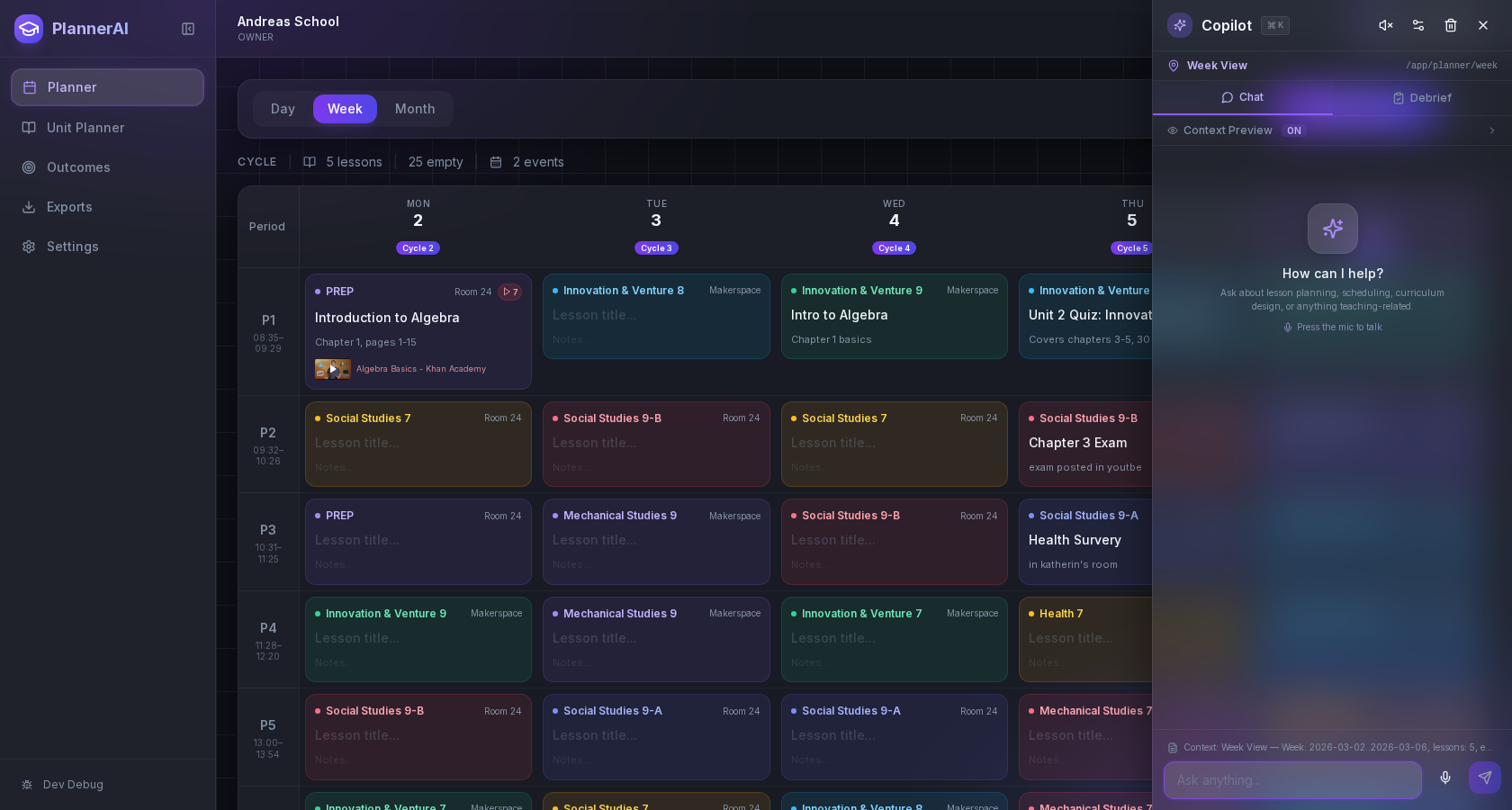
With groups labeled A/B/C, she drops them into each period’s plan. Because the schedule rotates, she notes where yesterday’s Group B in Period 2 needs today’s Group A task. Keeping groups tied to the timetable prevents copy-paste errors across classes.
- If you plan digitally, use a planner that sits on your real timetable and rotation days so groups and scaffolds follow the right period automatically. If you want that built in, see Classroom Radar features or this guide to planning for rotating schedules.
5) Build materials fast (but audit hard)
She uses AI to draft: sentence frames, a short “just right” excerpt, two discussion stems, and a model paragraph with one planted error.
- Prompt starter: “Generate a 120-word model paragraph for a 7th grader arguing that school sports should/should not require GPA minimums. Include one subtle reasoning error I can ask students to find.”
- Audit steps: check facts and reading level, remove bias, ensure supports are optional not stigmatizing, and confirm accessibility (alt text for images; print-friendly).
- Need printable activities or quick practice? Use an activity builder or export from your AI tool to a format you can tweak. If you want a ready-made path, try Activity Builder.
6) Wire in frequent, light-weight formative checks
She sets two checks that take under 5 minutes to read: a mid-lesson “two-sentence proof” and an end-of-lesson exit slip tagging the strongest evidence. These give the next day’s grouping signal.
- Have AI propose rubrics with 2–3 look-fors tied to the success criteria. Keep it concise enough to use live.
7) Protect student privacy
When using AI tools, she never pastes student names, full essays, or protected information. She summarizes patterns (e.g., “common errors: vague claims, dropped citations”) and uploads anonymized snippets if needed.
- District-managed tools are best; if using public tools, remove PII and avoid uploading student work. Check your policy and vendor terms.
8) Close the loop and schedule reflection
She schedules a 10-minute weekly reflection to refine prompts, trim excess steps, and record which mini-lessons actually moved writing forward. A short, honest note beats a perfect archive.
- Want to talk through plans instead of typing? Try voice notes and let your planner transcribe them; voice planning is a simple way to capture thinking on the go.

What stayed teacher work, what AI drafted—and the guardrails
AI sped up options and materials; the teacher still made the calls. Here’s the split Ms. Rivera found workable.
Teacher judgment
- Choosing success criteria and non-negotiable content.
- Designing the common mini-lesson that opens/closes each class.
- Scoring the quick checks and regrouping students.
- Addressing misconceptions, culture/context, and classroom relationships.
AI assistance
- Drafting tiered task variants and language supports (to be edited).
- Suggesting models, stems, and practice items at different reading levels.
- Converting outlines to printable formats.
- Summarizing patterns from anonymized snippets to inform next-day teaching.
Guardrails to make it safe and effective
- Align with Universal Design for Learning so “supports” are options, not labels. Vary representation, action/expression, and engagement.
- Use frequent formative assessment to validate whether the supports helped, then adjust. Target the next lesson, not the gradebook.
- Check privacy, equity, and accuracy. Don’t upload PII; review outputs for bias or stereotypes; verify facts and sources.
These practices are consistent with current U.S. guidance on responsible AI use in teaching and with established privacy guidance for educational technology. They also reflect evidence that timely feedback and formative assessment are among the most impactful levers for learning.
Two weeks later: how it worked (and what we changed)
By the end of Week 2, Ms. Rivera’s workload felt different. Prep blocks weren’t empty, but she spent them reviewing short exit slips instead of starting from scratch. Students in all five classes could explain the success criteria in their own words. Group A needed more time with evidence selection than expected; Group C moved faster once counterclaim models were clearer.
What stuck:
- The common mini-lesson gave coherence, even as groups diverged.
- UDL-style options reduced avoidance; students who usually “hate writing” chose audio brainstorming or color-coded outlines, then produced written drafts.
- The two quick checks produced the best signal for regrouping; longer tasks created grading drag with little added insight.
What changed:
- She trimmed the number of pathways from three to two on certain days to keep feedback timely.
- She replaced a generic prompt with a local issue to boost engagement.
- She kept sentence frames as optional scaffolds to avoid dependence; students chose when to hide or show them.
Results weren’t magic, but they were visible: more students wrote complete claims with relevant evidence, and the teacher left fewer periods feeling like she was “running uphill.”

Make it yours: quick-start templates and time-savers
Steal what’s useful and ignore the rest. Here are copy-ready starters you can paste into your tool of choice.
Prompt: tiered pathways (UDL + time-boxed)
- “You are a [grade/subject] coach. In 150 words per group, propose two lesson pathways toward: [success criteria]. Group A needs [support]; Group B is on track. Each pathway must include: (a) 10-min whole-class mini-lesson, (b) 20-min group task with at least two options for representation and two for action/expression, (c) 5-min exit check aligned to the criteria. Keep reading level at [level].”
Prompt: quick checks and feedback
- “Design a 3-criterion micro-rubric for this success criterion: [criterion]. Write plain-language feedback stems students can understand. Limit to 60 words.”
Prompt: accommodations and language supports
- “Given this task: [paste task, no PII], draft optional supports: sentence frames, visual glossary (5 terms), and talk-to-text outline for multilingual learners. Note which are universally useful so supports don’t single out students.”
Workflow checklist (print or pin)
- Write goals and success criteria.
- Run a 5–7 minute pre-check; sort into two or three groups.
- Ask AI for two UDL-aligned pathways and a shared mini-lesson.
- Generate/edit models, stems, and a micro-rubric.
- Schedule exit slips; plan regrouping for the next period/day.
- Remove PII from anything you upload; verify facts and bias.
- Reflect weekly on what to cut, keep, or scale.
If you’d like a planner built around this flow—timetabled lessons, outcomes linked, and an assistant to draft variations—explore Classroom Radar, the feature overview, or go deeper on speed with voice planning. For more time-savers, this roundup can help: 5 ways to spend less time on weekly lesson planning.
Frequently asked questions
Is it okay to use AI for lesson planning under FERPA?
Yes, but avoid sharing personally identifiable information (PII) unless your district has a vetted, compliant vendor. Summarize patterns (“many students confuse evidence and reasoning”) rather than pasting names or full student work, and review the tool’s data retention terms. When in doubt, keep sensitive data local and anonymized.
How do I differentiate without lowering rigor?
Keep the success criteria constant and vary access and expression. For example, let students listen to a text, annotate a short excerpt, or use sentence frames—but hold all students to the same standard for claim–evidence–reasoning. Use quick checks to see if supports are helping; remove or fade scaffolds as students succeed.
What if my students don’t all have devices?
You can still use AI to plan options, then run low-tech stations. Print short excerpts at two reading levels, offer an oral rehearsal station, and provide a color-coded outline template. The workflow is about how you plan; students don’t need to touch AI for it to help you teach.
How do I manage groups across an A/B rotating schedule?
Tie groups to periods in your plan and note the next checkpoint for each period. A planner that sits on your real timetable helps you carry yesterday’s Group B in Period 2 into today’s plan. If rotation days are a pain point, this guide can help: /blog/planning-for-rotating-schedules.
What prompts work best for differentiated instruction?
Prompts that anchor to success criteria, time boxes, and UDL options work best. Ask for two short pathways, specify supports (frames, glossary, model), and require a 5-minute exit check tied to the criteria. Keep reading levels and time limits explicit.
How do I align AI outputs to my standards and curriculum map?
Name the exact standard and success criteria in your prompt, then cross-check verbs and content. Keep a simple alignment table per unit, and paste it at the top of each prompt. If you use a planner that links lessons to outcomes, store the alignment there so it travels with the lesson.
The bottom line
Differentiated instruction doesn’t have to mean five separate lesson plans. Start with clear success criteria, sort students with a quick check, and ask AI to draft two or three UDL-aligned pathways you can edit with your professional judgment. Keep privacy, accuracy, and equity in view, and let fast formative checks steer your next lesson. If you want a planner built around this workflow, you can try Classroom Radar here: Classroom Radar.
Sources and further reading
- Artificial Intelligence and the Future of Teaching and Learning: Insights and Recommendations (May 2023) — U.S. Department of Education, Office of Educational Technology (via GovInfo)
- UDL Guidelines — CAST
- Feedback – Teaching and Learning Toolkit — Education Endowment Foundation (EEF)
- Privacy and Education Technology — U.S. Department of Education – Student Privacy Policy Office
- What’s It Like To Be a Teacher in America Today? (Survey of U.S. public K–12 teachers, Oct–Nov 2023) — Pew Research Center