Plan your lessons in conversation — by voice or by typing.
Planning happens between classes, not at a desk. Say “Help me plan the next Science 8 lesson” and Radar, the Classroom Radar assistant, looks at what the class did last, which unit it is in, the outcomes nothing covers yet and when the class really meets on your rotation. It asks one short question, shows you the whole draft — objectives, timed activities, materials — and redrafts it when you say “shorter warm-up” or “move it to Monday”. It also answers what you are teaching tomorrow and moves, copies and renames lessons out loud. Every change waits for your yes and can be undone.
What the AI can do
Radar looks up your timetable, lessons, units and curriculum on its own, drafts lessons, weeks and units, and proposes changes that you accept or refine.
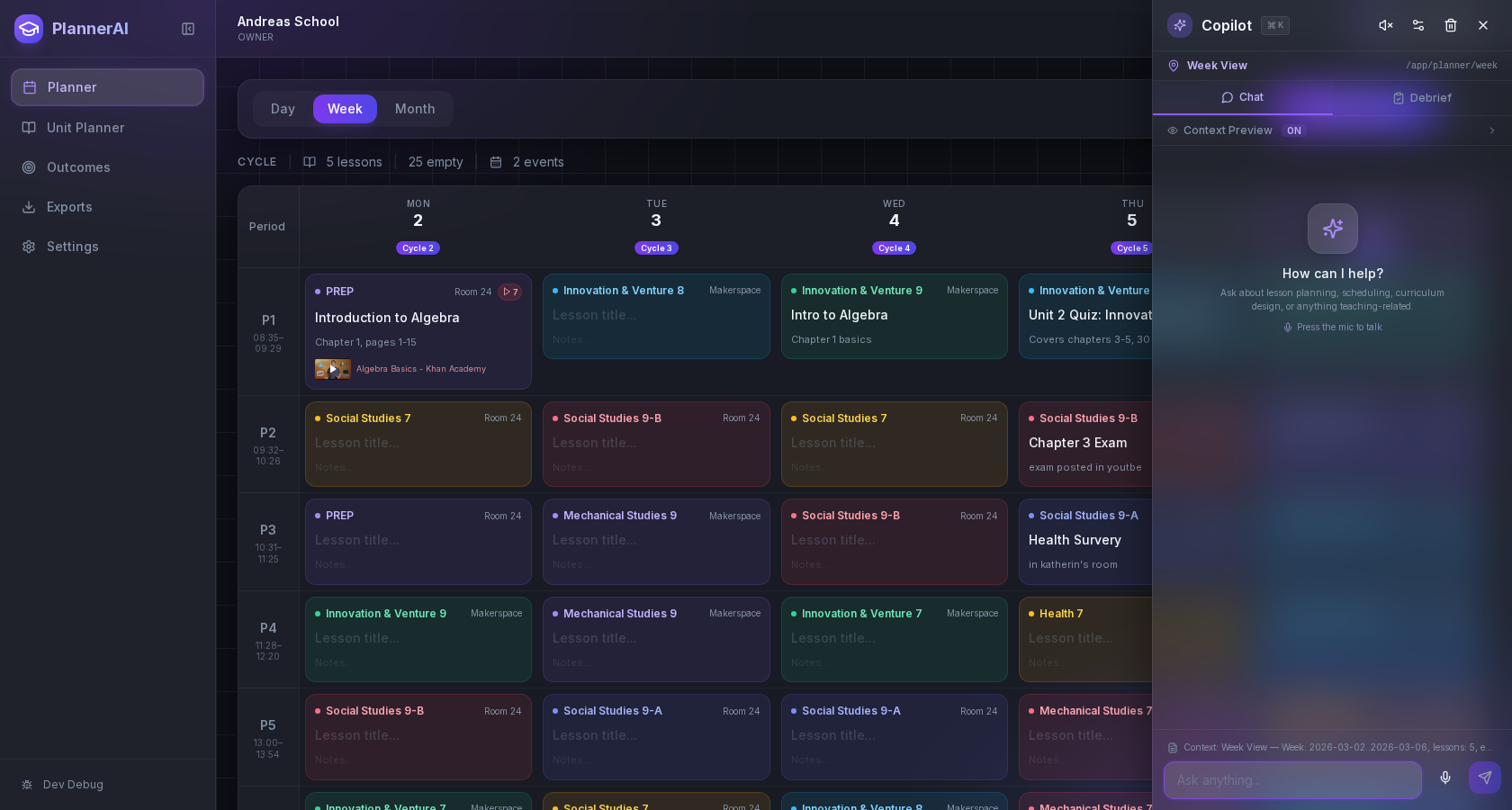
An idea moves from a spoken sentence to a drafted, scheduled lesson — after you agree to it.
Context aware
Connected to the weekly planner, schedule rules, and unit structure.
Teacher controlled
You review and refine changes instead of handing the whole process away.
Built for school reality
Designed around shifting timetables, real curriculum work, and mid-week edits.
Where Plan with Radar fits into the planning week.
Plan a lesson together: Radar reads the class’s last lessons, its current unit, uncovered unit outcomes and its next real meetings before it asks you anything.
See the full draft before it is saved — title, objectives, timed activities, materials, homework and linked curriculum outcomes.
Change the draft by saying so. “Make it forty minutes”, “add an exit ticket”, “move it to Monday” — Radar redrafts; a change is never taken as a yes.
Plan a week: Radar drafts a lesson for every class meeting with nothing planned, continuing from the lesson before, and you add them with one “Yes to all”.
Plan a unit: agree the outline first, then Radar places the unit and its lessons on the class’s real meetings.
Rework what is planned: push a sequence back, split a lesson, rewrite several at once — every change shown before it is made.
Ask about your schedule and hear the answer, on your real rotation: what is on today, what is next, what you have on Day 3.
Radar remembers the conversation you are in, and the history button lists every saved change across sessions, each with its own Undo.
Deleting always asks first, and nothing is removed on the strength of one sentence.
Real reasons teachers reach for this feature.
The next lesson, in a minute
Ask Radar to plan the next lesson; it already knows what came before, so you only choose the focus and approve the draft.
Filling the week
On Sunday night, “plan my unplanned German 7 classes this week” drafts each one in sequence; skim, tweak one, say yes to all.
Between classes
Ask “what am I teaching tomorrow?” on the way down the hall and hear the answer instead of opening the planner.
What it looks like when a teacher actually uses it.
These example prompts and outcomes show the kind of planning work this feature is designed to handle.
Prompt
"Help me plan Friday’s German 7 lesson." … "Paying the bill." … "Shorter warm-up, and add homework." … "Yes."
Outcome
Radar checks what German 7 did last and when it meets on Friday, proposes a lesson on paying the bill in a café, shows the full draft, redrafts it with a five-minute warm-up and a homework task, and saves it only after your yes — with Undo ready.
Prompt
"Fill the unplanned Science 8 lessons next week."
Outcome
A draft for each unplanned meeting, in order, shown together; add them all with one “Yes to all”.
Prompt
"What do I have on Day 3?"
Outcome
Answered from your rotation: every class that meets and what is planned for it.
Prompt
"Move this lesson to my next Social class."
Outcome
It lands on the next real meeting of that class, keeping its homework and attachments.
Keep exploring the planning workflow.
Related help
Learn how to use this in the product.
Getting Started
How to set up your teacher planner
Enter your classes and timetable once, and Classroom Radar plans every lesson on the dates those classes actually meet.
Read help guideCurriculum
How to connect curriculum outcomes to lessons
Choose the curriculum objectives each class covers this year, attach them to the lessons that teach them, and let coverage build itself.
Read help guideUnit Planning
How to create a unit plan
Build a unit with its guiding questions and objectives, then hold the lessons that teach it in the order you will teach them.
Read help guideRelated features
Keep exploring the workflow.
Create
Activity Builder
Build activity sheets and practice tests from what students should learn, edit every question, and print Student and Teacher versions as real Letter or A4 pages.
Read feature pageScheduling
Auto-Scheduled Plans
Units and lesson sequences can land on real class dates automatically using your rotation, holidays, and calendar overrides.
Read feature pageCalendar
Calendar Command Center
Your planner stays connected to the actual school calendar, not a generic week view.
Read feature pageEarly access
Try Plan with Radar inside the full planner
Join the waitlist to see how Classroom Radar connects weekly planning, AI actions, schedule logic, and curriculum tracking.
No credit card required. Early access updates only.