
Voice to lesson plan: how to capture ideas faster without losing structure
Voice to lesson plan: a step-by-step workflow to capture ideas by speaking, organize them into lessons, and fit voice planning into your school day.

In this article8 sections
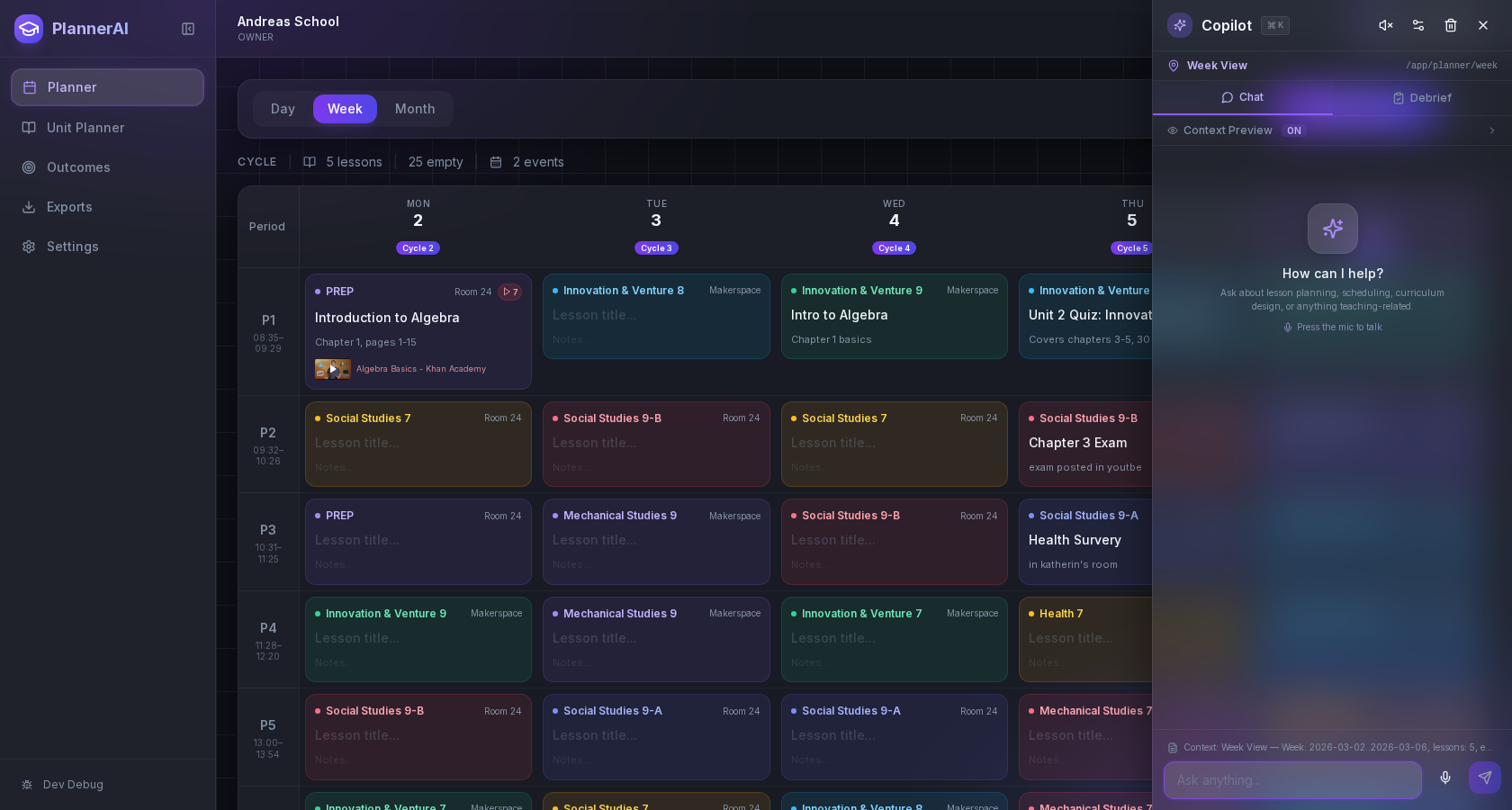
When your best ideas arrive between bells, a voice to lesson plan approach can help you capture them fast and turn them into teachable lessons. This guide shows a simple, repeatable way to speak your notes, keep them organized, and grow them into full plans—without adding to your workload. Use the steps with any phone recorder or transcription app. If you use Classroom Radar, you can also plan by talking with Voice Planning.

Why voice capture works when you’re under time pressure
Talking externalizes memory so you can plan while you move. Research on cognitive offloading shows that using external aids (like notes and recordings) reduces the information you must keep in working memory, which is why speaking ideas out loud often feels easier than holding them in your head until you can type. ([discovery.ucl.ac.uk](https://discovery.ucl.ac.uk/id/eprint/1508770/))
Planning time is tight. A 2026 analysis by the National Council on Teacher Quality found that U.S. teachers most commonly get about 3.5–4 hours of planning time weekly, averaging roughly 266 minutes across districts—time that is frequently fragmented. That’s exactly when quick, structured voice capture helps you keep momentum. ([nctq.org](https://www.nctq.org/research-insights/its-about-time-why-teacher-planning-time-is-important/))
Bottom line: speaking is a low‑friction way to catch insights at the moment you notice them (what worked, what didn’t, which misconception popped up), before the details fade. Then you can organize those snippets during a calmer block.
Two principles to keep your spoken notes useful
- Capture first, constrain later. During the day, prioritize getting ideas out of your head. Add structure when you review.
- Use a consistent micro‑template. For every note, say four beats in order: Objective → Activity → Check → Materials. Even a 20‑second note is enough.
The best moments to speak ideas instead of typing
Look for seconds and short minutes that already exist in your day.
- Right after a lesson (empty room, students at recess): a 30–60 second debrief while it’s fresh.
- Between classes (hallway or door duty): a quick note about pacing or a student misconception to address tomorrow.
- Prep period (walking to the copier): outline a mini‑sequence for the next day.
- After a student question: record the question plus your next‑lesson adjustment.
- End of day reset: say tomorrow’s top three tasks and the first step for each.
- Commute—only if fully hands‑free and legal: if your state allows, use a one‑tap, hands‑free command to drop a 15–30 second idea. Avoid any interaction that takes eyes or hands off the road; many studies associate phone use with higher crash risk. Check your state’s hands‑free and texting laws and prioritize safety. ([nhtsa.gov](https://www.nhtsa.gov/book/countermeasures-that-work/distracted-driving/countermeasures/legislation-and-licensing/cell))
If you plan on a rotating schedule, voice notes help you tag ideas to the right day/rotation without opening a spreadsheet. For a full rotating‑schedule workflow, see How to Plan Lessons on a Rotating Schedule.

A voice-to-lesson-plan workflow: capture, organize, expand, review
This four‑stage workflow turns raw voice snippets into teachable plans. Use it with your phone’s recorder and any planner. If you use Classroom Radar, Voice Planning lets you speak, auto‑tag to your real timetable, and connect to curriculum outcomes; see Voice Planning.
1) Capture (10–60 seconds each)
- Start with your micro‑template: “Objective: … Activity: … Check: … Materials: …”
- Tag aloud at the end: class/section, date or rotation day, and unit (e.g., “Grade 7 Science, Day B, Unit: Cells”).
- One idea per note. Many short notes beat one long ramble.
2) Organize (5–10 minutes)
- Batch listen during a break or after school. Rename or group notes by class/unit.
- Skim the transcript (if available) and convert fragments into bullets under headings: Objective, Activities (with timing), Formative Checks, Materials, Differentiation.
- Link to outcomes (standards/competencies). If you’re using Classroom Radar, attach outcomes to each plan and track coverage automatically; the lesson planner shows them against your real timetable.
3) Expand (10–20 minutes)
- Sequence steps from opener to closure. Keep total time realistic for your period length.
- Write prompts and questions exactly as you’ll ask them.
- Pre‑plan checks for understanding (e.g., exit ticket criteria) so you’re not improvising in the moment.
4) Review (3–5 minutes)
- Run a quick QA: Does the activity directly assess the objective? Is the check observable and short?
- Note adjustments you’ll make if time runs short or if students finish early.
Tip: If you use Classroom Radar’s assistant (Radar) to draft an activity or differentiate, add your constraints up front (time, materials on hand, class profile) to avoid bloat; then scan for accuracy and alignment before saving. See also the Activity Builder.

Where voice planning fits in prep, commute, and transition time
Plan by speaking in short, predictable blocks so it becomes a habit.
Daily slots that work
- First 5 minutes of prep: record two “tomorrow tweaks” based on today’s checks.
- Transition walks: one idea per hallway trip (say the tag out loud so you can sort it later).
- Lunch reset: one note for each afternoon class objective.
- End of day: capture the first 60 seconds of tomorrow’s opener while it’s fresh.
Weekly rhythm
- Monday: capture unit intentions for the week (big ideas, assessments).
- Midweek: record what to re‑teach and who needs it; flag groups.
- Friday: quick retrospective—what to repeat next cycle. For more on the habit, see The Case for Daily Teaching Reflection.
If you commute by car: only use completely hands‑free capture where permitted, and keep interactions minimal (one voice command, then eyes back on the road). Laws and risks vary; safety comes first. ([nhtsa.gov](https://www.nhtsa.gov/book/countermeasures-that-work/distracted-driving/countermeasures/legislation-and-licensing/cell))
Turn quick spoken notes into a full planning draft
Here’s a concrete, 20–30 minute process you can run after school or during a longer prep.
Step 1: Consolidate
- Collect all the week’s voice notes for one class. Sort by unit and lesson sequence.
- Highlight any repeated insights (e.g., “more modeling needed for multi‑step problems”).
Step 2: Build the skeleton
- Drop bullets under five headings: Objective, Opener, Core Activity, Check, Closure.
- Add Materials and Timing to each activity bullet. Keep it short: verbs and nouns only.
Step 3: Add teachable detail
- Write exact instructions you’ll say, sample answers, and success criteria for the check.
- Note supports/extensions for specific learners (sentence frames, manipulatives, challenge problems).
Step 4: Align and attach
- Map to standards/competencies and unit goals. If you use Classroom Radar, attach outcomes and see coverage on your timetable (features overview).
- Attach any files or link to activities. If you build worksheets, Radar can draft variations quickly; see Activity Builder.
Step 5: Final checks and privacy
- Quick audit: objective ↔ activity ↔ check alignment; realistic timing; materials ready.
- Student privacy: Avoid naming individual students in recorded notes or transcripts. FERPA exempts “sole possession” notes used only as a personal memory aid and not shared; once notes are shared or stored where others can access them, they can become education records containing PII. Treat names and identifiable details with care. ([studentprivacy.ed.gov](https://studentprivacy.ed.gov/faq/what-records-are-exempted-ferpa))
If you’re brand‑new to voice planning, start tiny: pick one class, capture three notes a day for a week, and run this process once on Friday. You’ll have a usable draft for Monday without typing walls of text.
Frequently asked questions
Is voice planning compatible with FERPA?
Yes—if handled carefully. Personal “sole possession” notes kept only for your own memory aid and not shared are generally exempt from FERPA; once notes are shared or stored where others can access them, they can become education records that include personally identifiable information (PII). Avoid naming students in recordings and transcripts unless your system is approved for student data. ([studentprivacy.ed.gov](https://studentprivacy.ed.gov/faq/what-records-are-exempted-ferpa))
Can I record voice notes while driving?
Only if it’s fully hands‑free, legal in your state, and you keep interactions to a single command. Phone use while driving is associated with increased crash risk; many states restrict handheld use and texting. Prioritize safety and check state laws before using any device on the road. ([nhtsa.gov](https://www.nhtsa.gov/book/countermeasures-that-work/distracted-driving/countermeasures/legislation-and-licensing/cell))
What tools do I need to try this tomorrow?
Any phone with a voice recorder or built‑in voice typing works. Set up a one‑tap shortcut to start recording, and create contact‑style tags you say out loud (e.g., “Grade 8 Math, Day A”). If you prefer a purpose‑built planner, Classroom Radar supports speaking plans that land on your real timetable and link to outcomes.
How do I keep spoken notes from turning into a mess?
Use a fixed four‑beat prompt—Objective, Activity, Check, Materials—every time. Keep one idea per note, tag the class/rotation aloud at the end, and batch‑organize transcripts into bullets during a single review block.
Will speech‑to‑text handle subject jargon and names?
Mostly, but review key terms. Speak proper nouns clearly, add unusual terms to your device’s dictionary if your app supports it, and skim transcripts for errors before finalizing your plan.
Where does voice planning fit with rotating schedules?
Use tags like “Day B, Period 3” in the recording so you can sort quickly. During review, drop each note onto the right rotation day. If you use Classroom Radar, it places plans on your actual rotation; see the rotating‑schedule guide linked above.
Make your planning faster to save energy for teaching
Voice planning lets you capture ideas at the speed they come, then turn them into structured lessons when you have a quiet minute. Start with three short notes a day, tag them aloud, and run the five‑step conversion once a week. If you want a planner built around this workflow—with your real timetable, curriculum outcomes, and an assistant that listens—give Classroom Radar a try at /.
Sources and further reading
- Cognitive Offloading (Trends in Cognitive Sciences) — UCL Discovery
- It’s about time! Why teacher planning time is important — National Council on Teacher Quality
- What records are exempted from FERPA? — U.S. Department of Education — Student Privacy Policy Office
- Cell Phone Laws — Distracted Driving Countermeasures — National Highway Traffic Safety Administration (NHTSA)
- Instructional Resources in Public School–Based Pre‑K: Findings from the Spring 2024 American Pre‑K Teacher Survey — RAND Corporation